


.png)
.jpeg)
In this article
For use at a Bitcoin ATM, choose a cryptocurrency wallet that supports the exact cryptocurrency and network selected on the ATM. The mobile app makes it easy to display your receiving address and send funds. A hardware wallet can store your keys off your Internet-connected device. The app’s name alone does not confirm compatibility with a specific Bitcoin ATM — check both ends of the transfer before making a transaction.
Bitomat.com is a location information aggregator. The terms of the transaction, supported networks, and verification requirements are determined by the operator of the selected device. Start with the map of Bitcoin ATMs, and then check the information for a specific location.
Which cryptocurrency wallet should I choose for a Bitcoin ATM?
- Compatibility: Check which coins and networks are supported. A token with the same name may exist on several different networks.
- Address handling: When making a purchase, you'll need a receiving address; when making a sale, you'll need the ability to send funds to the address provided by the operator.
- Access control: Determine whether you manage the keys yourself or whether the service provider stores them. Managing your own keys also means you are responsible for backing them up.
- Fees: When sending tokens, check the network fee. Some networks require you to hold their native coin to pay for the token transfer.
- Safe installation: Download the app from the manufacturer's official website or from a store recommended by the manufacturer. Do not install the wallet from a link received from an unknown person.
There is no single wallet that is best for everyone. More important than app rankings are transaction compatibility, how keys are protected, and the ability to securely regain access.
What is a cryptocurrency wallet?
A wallet allows you to check your balance, receive cryptocurrencies, and sign transactions. Cryptocurrencies are stored on the blockchain; the wallet manages access to them. The public address is used to receive funds. The private key allows you to manage them and must remain secret.
Many wallets use a recovery phrase, also known as a seed phrase. This is a backup of your wallet access—not a code to enter at a Bitcoin ATM. Do not share it with the operator, support staff, or on a website.
Hot wallet, cold wallet, and exchange account
- Hot wallet: a wallet that runs on a device connected to the Internet, such as a mobile app. It is convenient for everyday transactions, but requires that the device be secured and that a backup be created.
- Cold wallet: a solution that keeps keys offline. A hardware wallet signs transactions without revealing the key to the application on the computer. It does not eliminate the risk of an incorrect address, fraud, or loss of the backup.
- Exchange account: Access to funds and withdrawals depends on the provider’s policies. This is a different model than self-custody. Check network support, fees, and withdrawal terms before you start selling at a Bitcoin ATM.
A mobile app does not become a cold wallet simply because the user disconnects from the Internet. The phrase written down on paper is a backup of wallet access; it does not automatically mean that the wallet itself is operating in cold storage mode.
How do I buy cryptocurrency at a Bitcoin ATM for my own wallet?
- Check the service availability and the terms and conditions of the operator for the device you've selected. Choose a cryptocurrency and a network that are also supported by your wallet.
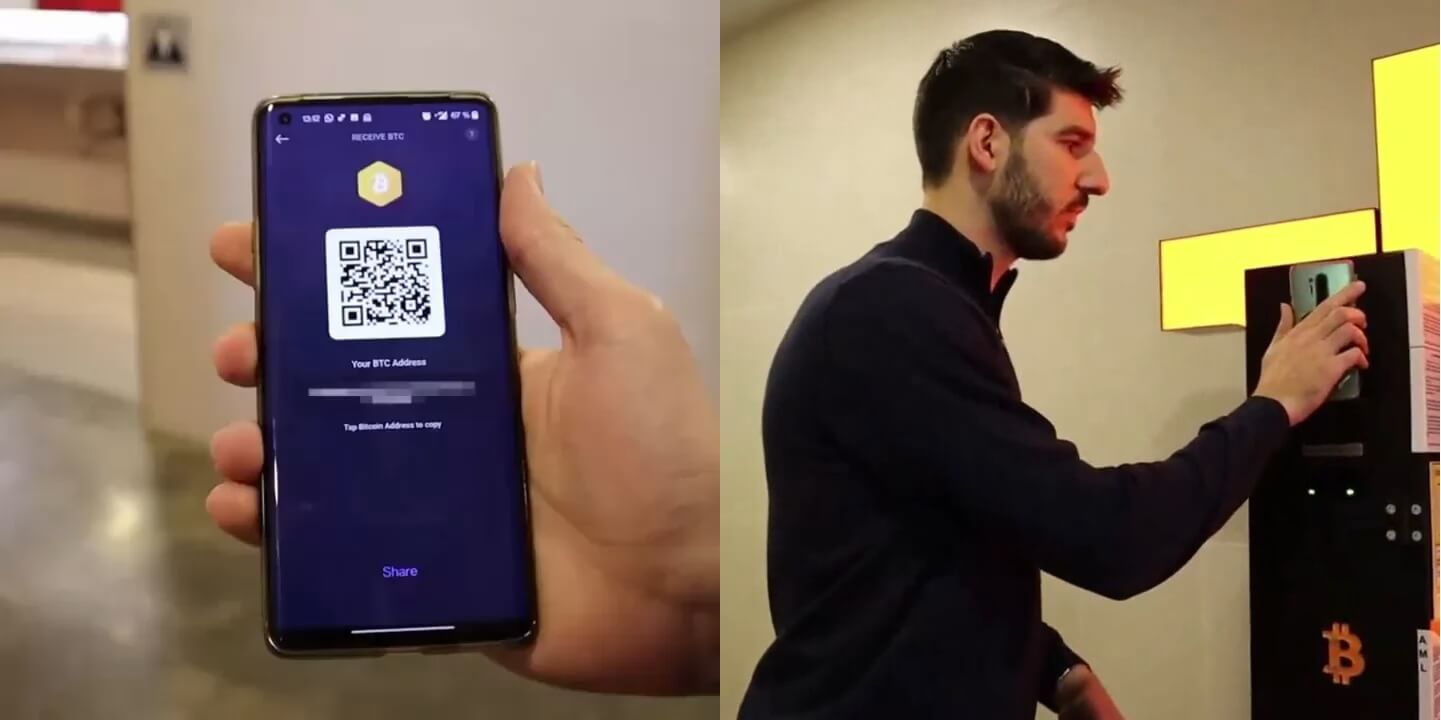
- In your wallet, select “Receive” for this cryptocurrency and network. Display the public receiving address as a QR code. Do not select “Buy” in the app—that is a separate service provided by the app’s provider.
- Scan the address following the Bitcoin ATM’s instructions. Compare the address and network, and check the exchange rate, fees, and the amount of cryptocurrency you will receive.
- Follow the device prompts and the operator's instructions. Keep your transaction receipt; the time it takes for the funds to appear depends on the transaction processing and the network.
See the complete guide to buying cryptocurrencies at a Bitcoin ATM.
How do I sell cryptocurrency from my wallet for cash?
- Select a Bitcoin ATM that supports selling cryptocurrency. Check the hours of operation, availability of services and cash, and the operator's requirements.
- Start the transaction by following the instructions on the device or the operator’s selling panel. Verify the cryptocurrency, network, deposit address, and withdrawal amount.
- In your wallet, select “Send”, scan the QR code displayed, and verify the address, network, amount, and fee. Then, consciously confirm the transfer—scanning alone does not complete the transfer.
- Keep your transaction ID and withdrawal code. Collect your cash after meeting the operator's requirements at a terminal that accepts this code. Not every Bitcoin ATM accepts a code issued by another operator.
The guide to selling Bitcoin for cash describes the individual steps. Confirmation times and withdrawal availability are not fixed.
How can I secure my wallet and regain access?
Secure your phone or computer, keep the app up to date and back up access according to the manufacturer’s instructions. Store your recovery phrase safely offline. Do not send it through a messaging app or photograph it. The QR code used for a purchase should contain the receiving address, never a recovery phrase or private key.
If you lose your device, the recovery process depends on your wallet and the copy you have. Not all wallets use the same method. Neither Bitomat.com support nor the Bitcoin ATM operator can recover your private keys. For an exchange account, follow the recovery procedure provided by the exchange.
Frequently Asked Questions About a Bitcoin ATM wallet
Does a Bitcoin ATM require a specific app?
Check the operator's requirements. For a transfer to go through, the cryptocurrency, network, and address must all match. Don't assume that just because the app supports a particular coin, it supports every network associated with that coin.
Can I use a hardware wallet?
It can provide a receiving address or sign a transfer if it supports the selected cryptocurrency and network. Always make sure to follow the operator’s instructions and verify the address on a trusted screen on your device.
Is scanning a QR code enough to sell cryptocurrency?
No. The QR code may include the address or other transfer details. Review them and confirm the transfer in your wallet; you will receive the cash according to the terms of the transaction.
Does the wallet exempt you from identity verification?
No. Using your own wallet does not waive the verification requirements for the transaction. Please follow the operator's current instructions.
Sources and Further Reading
- Ethereum.org: Wallets, Accounts, and Keys
- Ethereum.org: Receiving, Sending, and Network Compatibility
- Bitcoin.org: Securing Your Wallet
- Trezor: How a Hardware Wallet Works
This article explains how to use the wallet and a Bitcoin ATM. It is not a product ranking, nor is it a guarantee of the security or availability of the service in a specific location.
.png)
.png)