handbook

How to sell USDT for cash

This short guide will walk you through selling USDT cryptocurrency for cash using a nearby Bitcoin ATM. Exchange rate: shown on screen. Average transaction time: 4 minutes. KYC limit: depends on your location. Available networks are ETH, Optimism, Arbitrum, TRX, Polygon, BSC, and Solana. You will receive EUR. Let's get started:

step 1
step 3
USDT
cash, stack of bills, icon
step 2
Scroll to discover more....
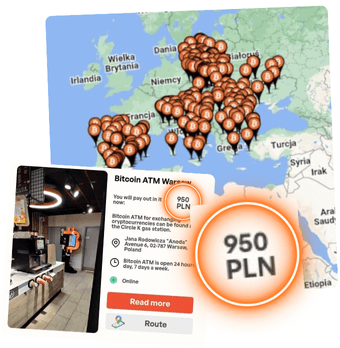
Map of cryptocurrency ATMs with cash balance marked next to one of them
01

Find a Bitcoin ATM

Locate the nearest cryptocurrency ATM using Map with hundreds of devices in your area. The map includes the amount of cash in each device, information on opening hours and links to Google Maps navigation.

02

Click "Show QR"

Are you already at the Bitcoin ATM? Choose USDT. The available networks are ETH, Optimism, Arbitrum, TRX, Polygon, BSC, and Solana. Read the sale price shown on screen. Then, press the button to print a QR code with the address to which you will transfer the sold cryptocurrency.
03

Scan the QR

Make sure you choose the right cryptocurrency or network. Also familiarize yourself with the network fee on the screen. Then, scan the code with your phone with any cryptocurrency wallet.

04

Wait for confirmation

If you don't want to wait at the ATM, you can sell now on this site , and collect the cash later from a compatible listed Bitcoin ATM. By the time you get to a nearby machine, the transaction should already be confirmed on the blockchain. Learn more about transaction speed here.

cash transaction, pile of banknotes, icon
05

Get your cash

Once the transaction has been confirmed on the blockchain, scan the second code (barcode) from the receipt. The Bitcoin ATM will then dispense cash. If you have questions about whether the transaction has been confirmed or other issues, you will find contact information for Customer Support on the machine.

Video tutorial

How do I sell USDT cryptocurrency for cash?

Watch a short video showing a purchase made directly at Bitcoin ATM. You'll receive cash in the local currency: PLN.

Check the amount of cash you will receive from the Bitcoin ATM after selling USDT

Sell so much USDT:

To receive the following amount* of cash:
0.00
Thank you! Your submission has been received!
Oops! Something went wrong while submitting the form.

*The network fee (gas fee), required to validate each USDT transaction on the blockchain, ensuring its correct recording and inclusion in the block, must still be deducted from the above value. This gas fee is also charged on sales returns.

The miner fee in the Tron network averages $2-4 per transaction. When selling USDT on the Tron network, remember that you also need about 0.10 TRX ($0.015) in your wallet to cover the necessary validation costs.

For USDT on the ETH network (ERC-20), the fee averages $1-10. This depends on how much Gwei is currently costing gas, and on layer-2 networks such as Arbitrum and Optimism, the average is around $0.50.

On the Polygon network, the fee averages $0.20. The process of verifying and adding transactions to a block may vary depending on the load on a given network. You can check the exact miner fee on the Bitcoin ATM screen or at mempool.space.

You can use arrows to increase and decrease numbers.
black icon
Quick
black icon
Conveniently
black icon
Intuitively

A Bitcoin ATM is like a regular ATM, but for Bitcoin!

This is the easiest way to make a cryptocurrency transaction.

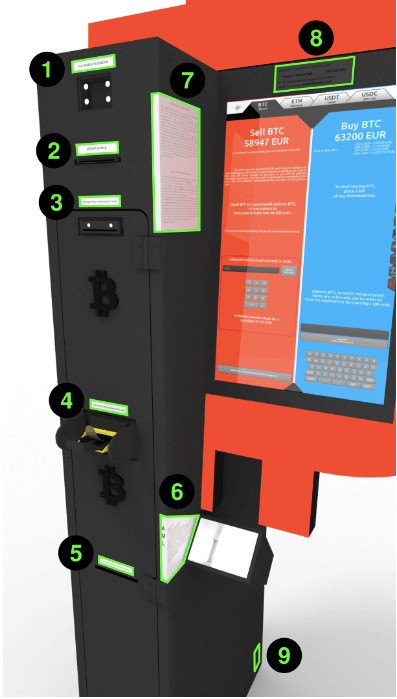
Elements of the Bitcoin ATM when selling USDT

Screen
👈 If you want to take a look at the Bitcoin ATM screen too.

After selling USDT for cash (for local currency), you receive a barcode. You scan it here, then receive the cash.

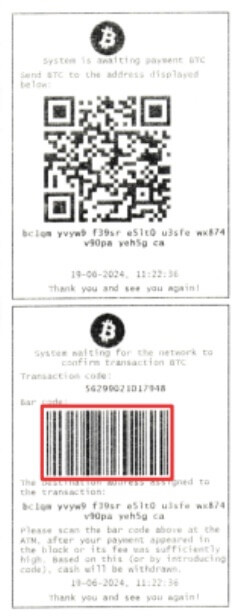
Prints the codes: QR Code at the top and Barcode at the bottom (in red).

The Barcode, located at the bottom, is used to withdraw funds in national currency. After scanning it at the top of the device (1), the cash withdrawal process will begin.

Barcode highlighted in red

The QR code (at the top of the printout) is used to send cryptocurrency to an address, allowing you to withdraw funds in local currency at a Bitcoin ATM. This code can also appear during a sale on the website or on the Bitcoin ATM screen. This is the receiving address for the sale. Scan it with any cryptocurrency wallet on your phone to transfer funds and receive the barcode (at the bottom).

Newer models allow large numbers of banknotes to be placed at once.


It may happen that after selling USDT for cash, there are fewer than 10 units of national currency or other currency left on your code, and the ATM does not dispense coins. Here's how we offer a solution to this situation:

Adding to your next withdrawal: If you send more USDT to the same address or have several transaction codes with unpaid funds, the balance will be added to your next withdrawal. We will add up the amounts and add them to one code, allowing you to withdraw the entire amount at a compatible listed Bitcoin ATM near you.

Return option: There is also a refund option, but we point out that amounts of less than 10 units of national currency are only refunded in Solana cryptocurrency. For other cryptocurrencies we support, such an amount would not even be enough to cover the transaction fee.

QR for a specific withdrawal in national currency: You can also select "QR for specific withdrawal in units of national currency." Enter the amount in local currency you want to withdraw and generate a QR code. Your wallet will adjust the amount of USDT so that you receive exactly the amount you declared, avoiding leaving small balances on the transaction codes.


Identity verification may be required in accordance with the operator’s KYC/AML procedures. Additional requirements depend on the country, the amount, the transaction risk, and current regulations.

If you encounter a problem when selling cryptocurrency for cash, please contact Customer Support. Help in your language is available via phone, email, Telegram and Whatsapp.

Bitcoin to CHF sales screen

Social media
Talk to others — join a community of thousands of investors.

Choose from Bitcoin, Ethereum, USDT, USDC, Tron, Litecoin, and Solana. Available networks include TRC20, ERC20, Arbitrum, Optimism, and Polygon. Bitcoin ATMs support the Lightning Network.


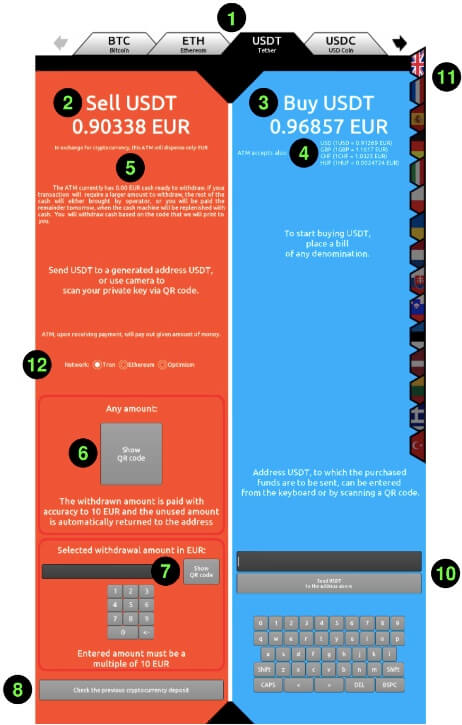
Price after deducting the operator fee. The operator fee is variable and averages about 3% compared with exchange rates. During promotions, it can be 0%. The current rate is shown on screen when selling 1 USDT.

The price does not include the network/miner fee. Some cryptocurrencies and networks have no miner fee or have it covered (Arbitrum, Optimism, Polygon, Litecoin, Solana). Others, such as Bitcoin or Ethereum, can range from $1 to $3. In a few historical cases, they have reached $50. Learn more about transaction speeds and costs in this guide.

Under the purchase price, it displays the price for the various fiat currencies that are available for deposit at the time of purchase.

Information on how much cash you can withdraw from this Bitcoin ATM. You don't have to come to the Bitcoin ATM to check how much cash is in it. All you need to do is use the Bitomat.com map, where this information is given.

The "Show QR code" button (6) generates an address for depositing the selected cryptocurrency, allowing you to withdraw cash. The address will be displayed on the ATM screen and printed on paper.

Before you press it, make sure you choose the right cryptocurrency and network! Be careful when choosing a cryptocurrency (1) and a transmission network (12), especially with currencies such as USDT or USDC.


Optionally, select the exact amount of national currency for which you want to sell USDT. An address will be generated which, when scanned, will result in this exact sale every single unit of national currency.

Additional option: After tapping, enter the barcode number. If the transaction has already been confirmed on the blockchain, the Bitcoin ATM will dispense cash.

When you insert cash into the ATM, a panel will open displaying the amount of cash you deposited, the value of the cryptocurrency you will receive, and the blockchain network fee. In this section, you can scan the address of your cryptocurrency wallet or enter it manually using the keyboard. Make sure you are sending funds to the right address by checking the cryptocurrency you want to send (1) and the network you are using (8). This is especially true in the case of USDT or USDC. Transferring to the wrong blockchain network can result in loss of funds.

Due to the length of the address, 99% of users scan the address using the QR code. However, you can also enter it here manually using the keyboard.

Choose from 20 available language versions.

Some of the cryptocurrencies offer transactions on different networks. Choose one of them here. Despite the available security features, choosing the wrong network can result in loss of funds. Bitcoin only offers transactions on one main network, so if you are interested in transacting on BTC, you don't choose a network.

BTC: main network (does not support Lightning Network)
ETH: ETH, Arbitrum, Optimism, Polygon
USDT: TRC20, ERC20, Arbitrum, Optimism, Polygon
USDC: ERC20, Arbitrum, Optimism, Polygon

Learn more about networks from this article.

How to sell other cryptocurrencies for cash

Choose another cryptocurrency you would like to sell for cash. Prices below already include commission.

Price
Sell now and pick up cash at a Bitcoin ATM

Sell now and withdraw cash at a Bitcoin ATM
Nearest Bitcoin ATMs